36 Month Financing
Steps to Process the 36 Month Payment Plan:
1-Patient must fill out the entire 36 Month Financing form. (Make sure they include their email address and have their voided check or letter from their bank.)
2-Log onto: https://my.compassionatehealthcareservices.com
3- Click on the "Loan Application" tab on the left-hand side of the homepage and fill in all information. Use the credit form that patient filled out. (You can ignore the "Merchant Account #" box, and the "Merchant Invoice #" box
4- Click on “Run Credit” (it's on the right side of the screen).
5- Confirm to run credit=check the box, then click "Run Credit"
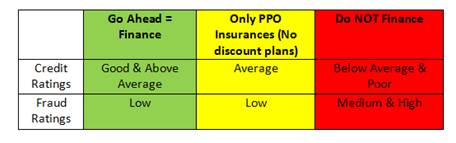
6- You will then be directed back to the patient application. You will see on the right hand side what the "Credit and Fraud Rating" came back as.
- Credit Ratings: Good, Above average, Average, Below average, poor
- Fraud Ratings: Low, Medium, High
- Credit check is only required on the 36 month financing plan. (The membership plan, and 4-month plan do not require a credit check.)
7- Click on "Save Progress" or "Save & Close" from the right hand side. This will save the application under the "Operations" tab.
8- Click "Print the Agreement" on the right hand side of the application page. All the information is pre-filled and ready for the patient to sign.
- The first page is a cover sheet
- Promissory note (Patient must sign).
- Truth to lending disclosure statement, this page will include their finance charges. (Patient must sign)
- ACH Agreement Form - This document authorizes Compassionate Healthcare Services to withdraw the money out of their account each month. (Patient must sign and date the bottom) Attach a voided check or bank letter to this form.
9-After all documents are signed fax them to Comprehensive Finance. The information is on the cover sheet.
10- After printing the documents, return to the application and click the "Complete" button. You will then be directed to a conformation page. Check the box (stating that you have all the documents signed) and hit "Complete" again. The loan is now processed.
- Add a note to the "Account" tab under “Fam Urgent Fin Note” in Open Dental that the patient is on “Fast Checkout(36)” and save the credit card information in the computer with the “Credit Card Manage” tab.
Helpful Hints:
- If you hit "Save and Close" then you can find the patients application under the "Operations" tab under "New Applications" You can edit the documents simply by clicking the "Edit" button under the actions.
- To check on any information simply log in and find the list of names that have current plans. By clicking on the patients account number you will be directed to another screen with all of their account information and plan.
- Is the patient right for this program? We need to cover the hard cost or the lab fees and time we will use by getting a down payment and using insurance. We must collect the first payment or the 25% down EVERY TIME BEFORE TREATMENT BEGINS!
- Patient worthiness and fraud analyses is determined not by FICA scores but by checking account history, NSF charges, seeing if they are making current payments on time, job history, and history at current housing location. = Higher approval rates than "Care Credit" or other 3rd party lenders.
- A voided check must be included in the application. If the patient doesn't have a check or is just using a debit card they can request a standard letter from their bank. This letter must include the banks name, routing and checking account #'s, and the name on the checking or savings account. Banks provide these letters for just such a purpose.
- Four days before the payment is going to withdraw from a patient's account they will receive an email to remind them that funds will be withdrawn.
Collections:
- If the payment is returned to us for NSF (Non-sufficient funds) the account will start into a "soft collections" process. The patient will receive emails and phone calls from the finance company. They will also try to reprocess the payment on the following Friday. The goal is to try and get the patient back on track. If the payment on Friday is also declined then the finance company gets more and more aggressive.
- When payments cannot be obtained by the finance company we then are notified and will have to either turn over to a "Hard Collections" company and/or write off.
How to Set up Payment Plan
| Option #3 | ||||||||
| 1. Enter the following 4 numbers into the respective payment plan fields. | ||||||||
| "Total Amount" | $700.00 | |||||||
| "Date of First Payment" | Next month | |||||||
| "Down Payment | $175.00 | |||||||
| "APR" | 15.9% | |||||||
| "Number of payments" | 36 | |||||||
| "Tx Completed Amt" | $700.00 | |||||||
| 2. Amortization Schedule will look like: | ||||||||
| Payment #1 | $525.00 | |||||||
| Payment #2 | $525.00 | |||||||
| Payment #.... | $525.00 | |||||||
| Payment #36 | $525.00 | |||||||
| 3. Now go to "Credit Card Manage" and process first payment today, click save token | ||||||||
| 4. Now go to "Credit Card Manage" and set up repeating charge. Enter "Charge Amt," "Date Start" (next month), & "Date Stop." | ||||||||