Payment Plan Cheatsheet
How to set up a recurrent payment plan and save a credit card on file.
Non Flexible Items
- Must pay 1st payment today
- Must have card on file
- Pt must have insurance that pays
- Minimun total amount of $300
- **Remember Membership, Medicaid, Chip & discount plans only get 12 month w/ Care Credit**
Flexible Items
- Can be less then 4 months
- Whatever the Doctor says
Setup a Payment Plan
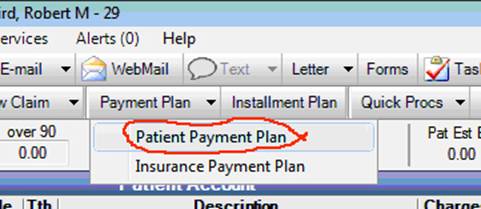 Create payment plan: click on “Payment Plan: Patient Payment Plan ”.
- Change guarantor if needed.
- Change provider to TP doctor.
- Enter"Total Amount"
- Modify first payment if applicable
- Enter Downpayment for 1/4 due today
- Enter 24% into APR.
- Enter 3 into “Number of Payments”.
- Click “Create Schedule”.
- Click "View Tx Credits," type in Amt:, Click "Add," Click "OK."
- Click "Print," then Click "OK" to close window. Family Balance should show credit to match Treatment Plan.
- Have Pt sign this and SCAN this signed document with matching Treatment Plan or Statement. Then give patient original paperwork.
- Save Patients Credit Card and run today for 1st payment (or could save if to be run first time at a later date.).
- For a membership plan you could do a 12 month plan with the first payment set to today.
Adding a Credit Card to File
1. Select the appropriate guarantor and go to “Account” screen.
2. Click on “Credit Card Manage”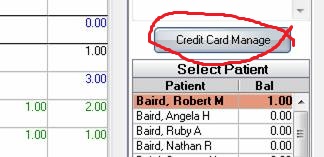
3. Click “Add”
4. Swipe card when prompted or type #’s in if the patient is giving a card over the phone.
5. Click “Process” nothing will be charged but the number will now be saved.
**Another method is to click the “Save Token” box when taking a payment. 